Invocation Logs
Every agent.run() call is recorded as an invocation. This is the platform's built-in
observability for AI: a complete, per-tenant audit of what the model saw, which tools it called, what it
returned, and what it cost. Nothing to wire up; it is on by default.
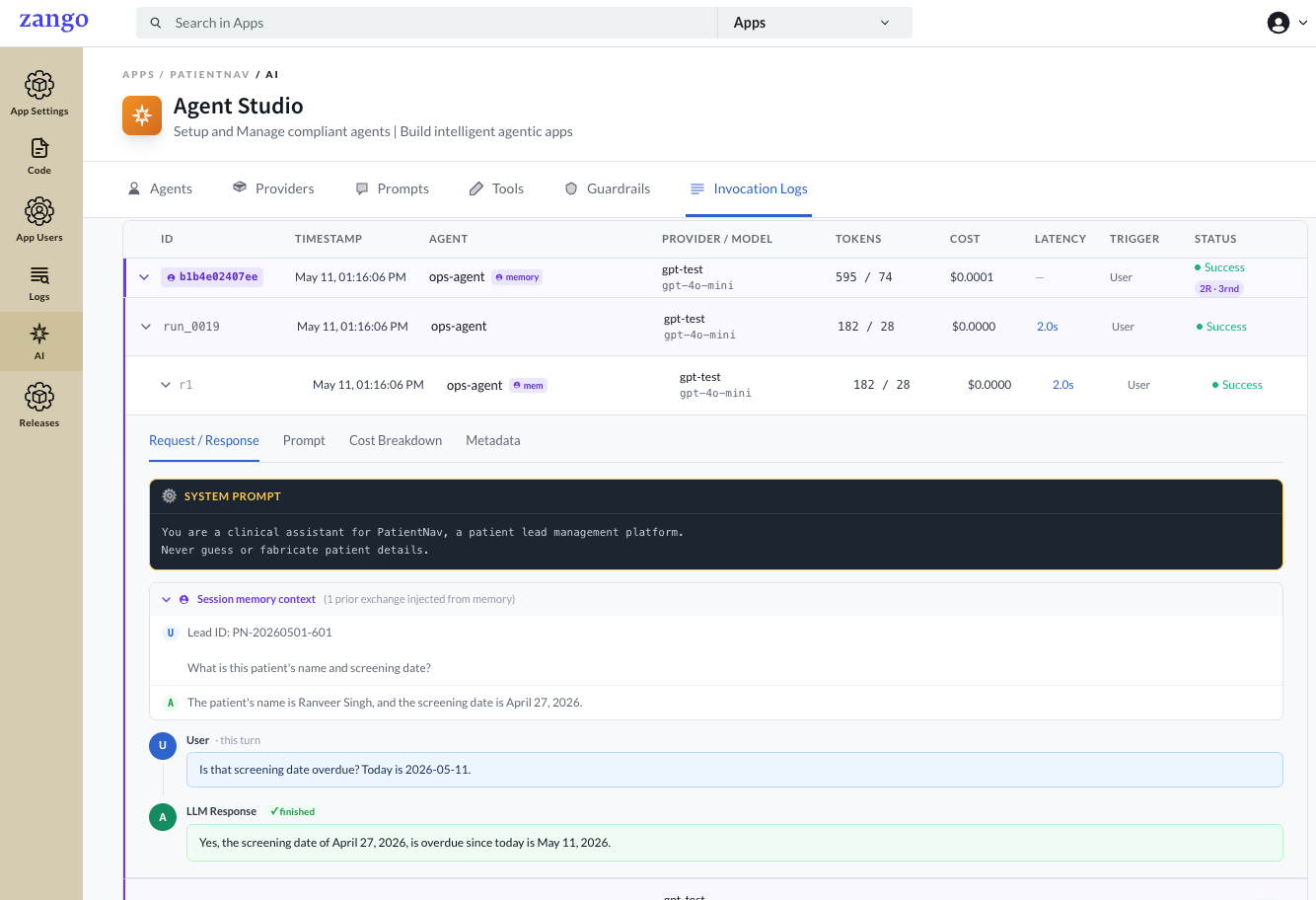
agent.run() is recorded with its rendered prompts, tool calls, token counts, cost, and status.What a run records
Each invocation captures a header summary and a full trace. The summary tracks the agent, provider and
model, input/output tokens, cost in USD, latency, the trigger (user, system, or
task), and the final status (Success, Failed, or Timeout). Live totals roll up across the
tenant: total runs, runs today, errors in the last 24 hours, and cost today.
Rounds
A single run can span multiple rounds, one LLM call each. Multi-round runs happen when the agent calls a tool and then makes a follow-up call to use the result. Each round records its own tokens, cost, latency, and status, and exposes four views:
| View | What it shows |
|---|---|
| Request / Response | The full message sequence: rendered system prompt, the user message with variables substituted, and the LLM response. Tool-call rounds show the tool name, the arguments passed, and the result your code returned. |
| Prompt | The prompt names and versions used, the rendered system prompt, and a context snapshot of the variables and system_variables supplied at runtime. |
| Cost breakdown | Stop reason, input/output tokens, prompt-cache creation and read tokens, total cost, and latency for the round. |
| Metadata | Trigger source, user ID, Celery task ID, model, status, error type, timestamps, time-to-first-token, and the raw request parameters sent to the API. |
File attachments
When files are passed via files=, each is saved to the tenant's storage for audit and shown
with its filename, media type, size, source, and a truncated SHA-256 hash. Files attached via
LLMFile.from_url() record the URL but are not mirrored; all other sources are mirrored and
downloadable. Audit storage is fail-open: if persisting a file fails, the run continues and the error is
logged.
Memory sessions
When an agent has short-term memory enabled, the log shows the full conversation context injected from prior turns, so you can audit exactly what history the model saw on each call.
Cost tracking
The log aggregates cost per run and per agent, so you can spot expensive agents, watch cost trends, and
estimate per-tenant spend. The response.cost_usd value returned by agent.run()
matches the cost recorded here, and cumulative spend per agent is tracked in total_cost_usd.