Agents
An Agent is a named, configurable LLM persona that combines a provider, prompts, model settings, and tools. Agents are scoped per tenant and referenced by name in your application code. The plugin creates and wires agents for you through the platform API; this page describes what an agent is made of and how to call it.
"Add an agent that reads a case's history and suggests the next clinical step" is enough. The plugin
selects the provider and model, attaches the right prompts and tools, and exposes the agent under a name
you can call with get_agent().
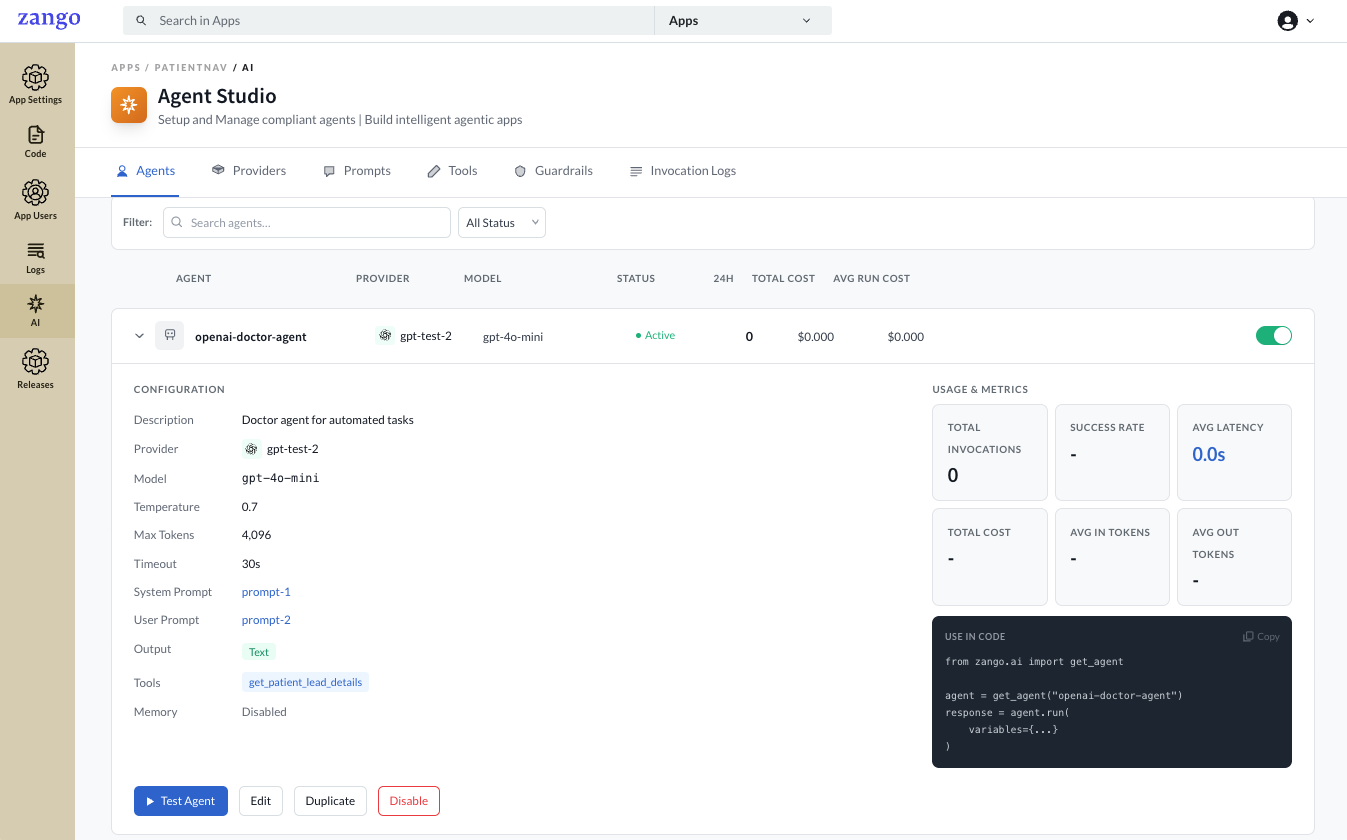
get_agent().Agent settings
| Field | Description |
|---|---|
| Name | A unique slug used to look up the agent in code (e.g. patient-summary-agent). |
| Description | Internal description of what the agent does. |
| Provider | The configured LLM provider to route through. |
| Model | The specific model (e.g. gpt-4o-mini, claude-3-5-sonnet). |
| Temperature | Randomness. 0.0 is deterministic; 1.0 is creative. Default 0.7. |
| Max Tokens | Maximum tokens in the response. Default 2000. |
| Output Schema | Text for plain text; JSON for structured output (see below). |
| Short-term Memory | Retain conversation history across agent.run() calls in a session. Max Messages sets the sliding window (default 20). |
| Prompts | The system and user prompts sent on every run. |
| Tools | The tools the agent is allowed to call. |
JSON output schema
When Output Schema is JSON, the agent returns structured data validated against a schema. The rules
differ by provider.
- OpenAI
- Anthropic
Three strict requirements apply:
- Every
objectneeds"additionalProperties": false - Every property must be in
required - Nullable fields use
anyOf, not{"type": ["string", "null"]}
{
  "type": "object",
  "additionalProperties": false,
  "required": ["summary", "is_urgent", "tags", "assigned_to"],
  "properties": {
    "summary":     { "type": "string" },
    "is_urgent":   { "type": "boolean" },
    "tags":        { "type": "array", "items": { "type": "string" } },
    "assigned_to": { "anyOf": [{ "type": "string" }, { "type": "null" }] }
  }
}
Standard JSON Schema, no strict rules. Optional properties, shorthand nullable types, and objects
without additionalProperties are all accepted.
{
  "type": "object",
  "properties": {
    "summary":     { "type": "string" },
    "is_urgent":   { "type": "boolean" },
    "tags":        { "type": "array" },
    "assigned_to": { "type": ["string", "null"] }
  }
}
Referencing the agent in code
The Name is the identifier you use to resolve the agent at runtime:
from zango.ai import get_agent

agent = get_agent("patient-summary-agent")
response = agent.run(variables={"patient_id": 42}, triggered_by="user")
print(response.content)
For every way to call an agent (plain text, prompt variables, file attachments, memory sessions, JSON output, background tasks), see Running Agents.
If the name does not match exactly (it is case-sensitive), get_agent() raises
AgentNotFound. The agent must also be enabled to resolve.
Lifecycle
Agents can be edited or deactivated at any time. Deactivating an agent prevents get_agent()
from resolving it without any code change, which is a safe way to take an agent offline.
Next steps
Attach prompts and tools, then run the agent from your code.